Who This Is For
If you’ve ever dealt with DNS records — setting up domain verification, configuring SPF/DKIM for email, or just wondering why a DNS lookup returns different results on different machines — this post is for you. You don’t need to be a DNS expert. You just need to have been bitten by something that “works on my machine” but fails elsewhere.
The Silent Failure
You add a TXT record for domain verification. You test it on your laptop — works fine. You deploy to production — it silently fails. No errors, no timeouts, just… missing records.
The culprit? DNS truncation.
What’s Actually Happening
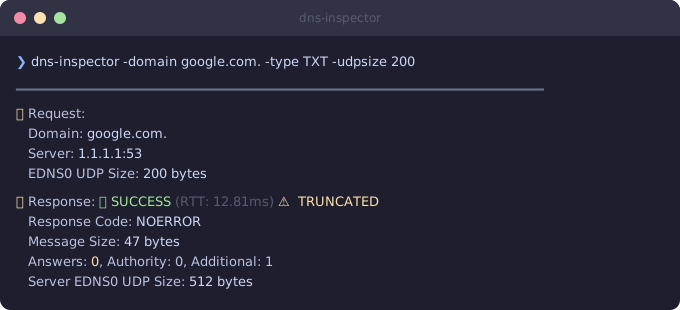
DNS over UDP has a size limit. When a response exceeds the client’s advertised buffer size, the server truncates it — sets the TC (truncation) bit and returns zero answers. Not partial answers. Zero.
The tricky part: different environments use different buffer sizes.
| Buffer Size | Where You’ll See It |
|---|---|
| 512 bytes | Legacy resolvers, strict firewalls |
| 1232 bytes | Modern defaults (DNS Flag Day 2020) |
| 4096 bytes | Your laptop, most dev environments |
Your laptop queries with 4096 bytes and gets everything. Production uses 1232 or 512 bytes and gets nothing. Same domain, same records, completely different results.
Seeing It in Action
I built dns-inspector to make this visible. It’s a Go CLI tool that lets you test DNS queries at different UDP buffer sizes — no DNS expertise required.
Install it:
go install github.com/guessi/dns-inspector@latest
Query with a small buffer (200 bytes) — the response is truncated, zero answers returned:
Now with 4096 bytes — the full response with all answers:
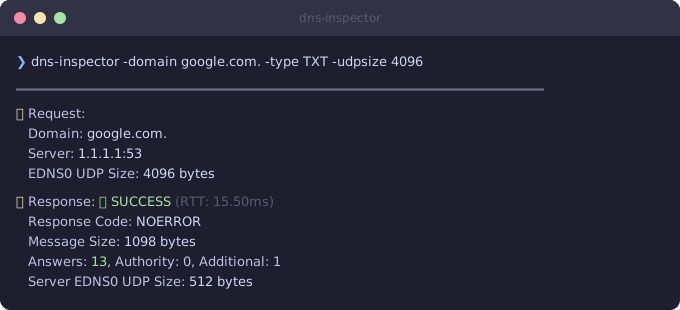
Same domain, same server, different buffer size.
When Even Max Buffer Isn’t Enough
Some domains have so many records that UDP can’t handle them at all:
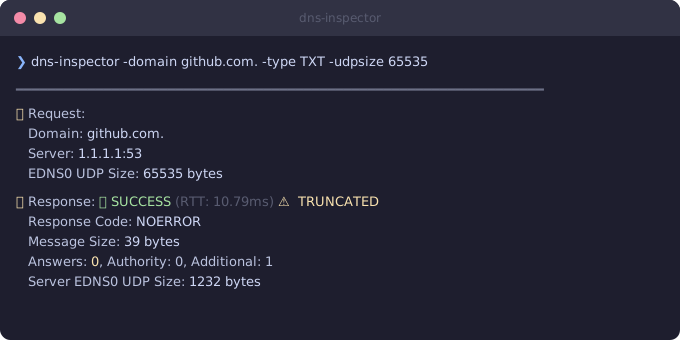
Even at the maximum UDP buffer size, the response is still truncated. The client has to fall back to TCP. This is a real-world limitation that catches people off guard.
What To Do About It
If you’re debugging missing DNS records:
- Check the buffer size your resolver is using. It might be smaller than you think.
- Test with dns-inspector at different sizes to find where truncation kicks in.
- Consider TCP fallback — if your records are too large for UDP, make sure your infrastructure supports DNS over TCP.
You don’t need to understand RFCs or packet captures to debug this. Just run the tool, compare the output, and the problem becomes obvious.
The tool is open source: github.com/guessi/dns-inspector